Earning the points is the easy half. Most people reading this already have a pile of miles sitting in two or three programs. The hard half is finding a seat that can actually be booked with them, on a date you want, without opening a dozen airline websites and checking each one by hand.
That gap is why award search tools exist. Here is how they work, what they genuinely save you, and the one habit that matters more than any tool.
The problem in one picture
This is a Paris to New York search on Google Flights, with an award search extension running in the browser. The cash prices are Google's. The little coloured badges are the extension, showing what each flight costs in points.
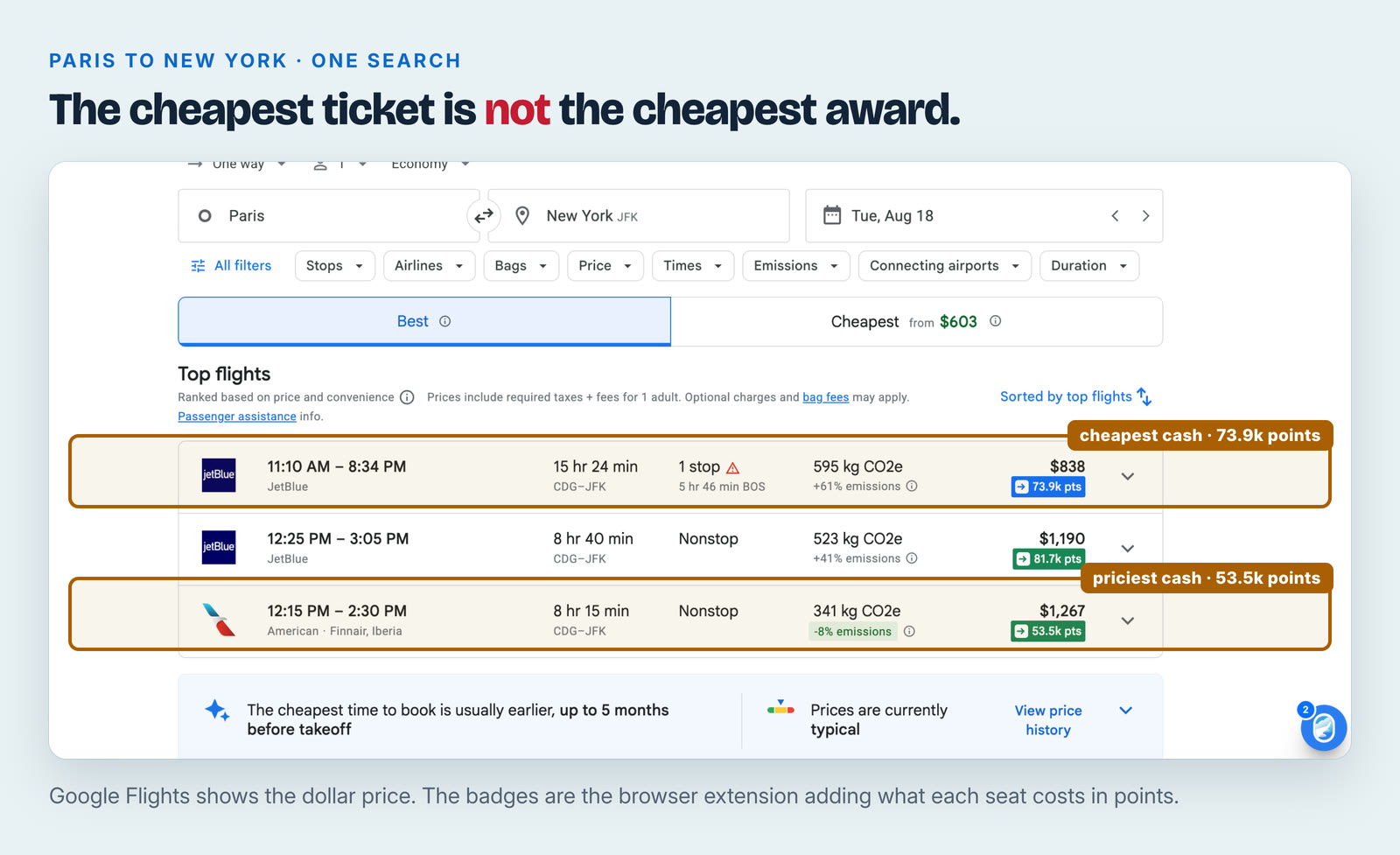
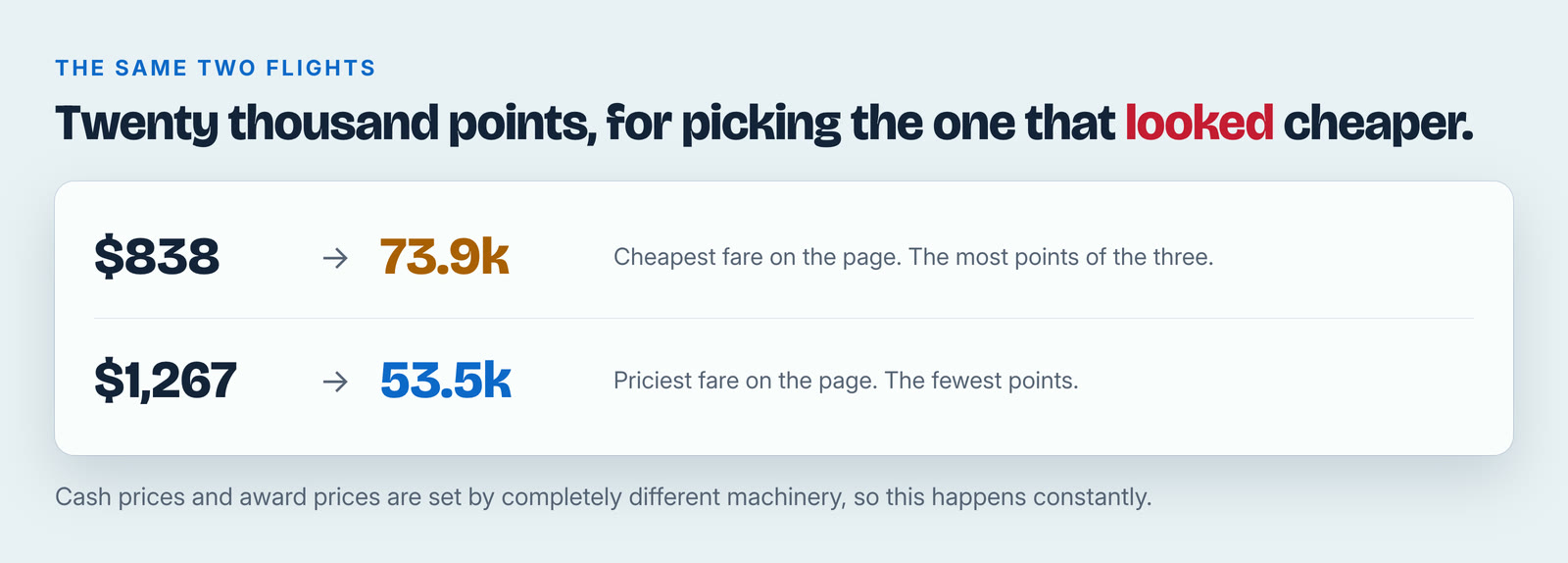
Look at the top and bottom rows. The cheapest flight for cash is $838, and it wants 73.9 thousand points. The most expensive flight for cash is $1,267, and it wants 53.5 thousand points.
The most expensive ticket is the cheapest award. That is not a glitch, it is normal, and it is invisible unless something puts both numbers side by side. Cash prices and award prices are set by completely different machinery, so the cheap cash fare being the expensive award happens constantly. It is the same reason the same 10,000 points can be worth $14 or $40 depending on where you send them.
If you book on instinct, you pay twenty thousand extra points for the privilege of picking the flight that looked cheaper.
What the tool is doing for you
An airline will happily show you what a ticket costs in dollars. Finding what it costs in miles, and whether a mileage seat exists at all on your date, means logging into each program separately and searching one at a time. Star Alliance, oneworld and SkyTeam have dozens of members between them, and the same physical plane prices very differently depending on which program you book it through.
Seats.aero is the tool we use. Their signup page describes searching across 24 mileage programs, with alerts and route tracking. The extension's own store listing claims more than 25, so treat the exact count as approximate. The browser extension is the part we would point a beginner at first, because it requires learning nothing: you keep using Google Flights exactly as you already do, and the points prices simply appear.
Their Chrome Web Store listing describes support for more than twenty-five loyalty programs across all three alliances and names Chase Travel and Amex Travel alongside Google Flights. The extension has around seventy thousand users, was last updated on July 30, 2026, and is published by Travel Data Corporation.
You can narrow it to the points you actually hold
This is the setting that turns it from interesting into useful.
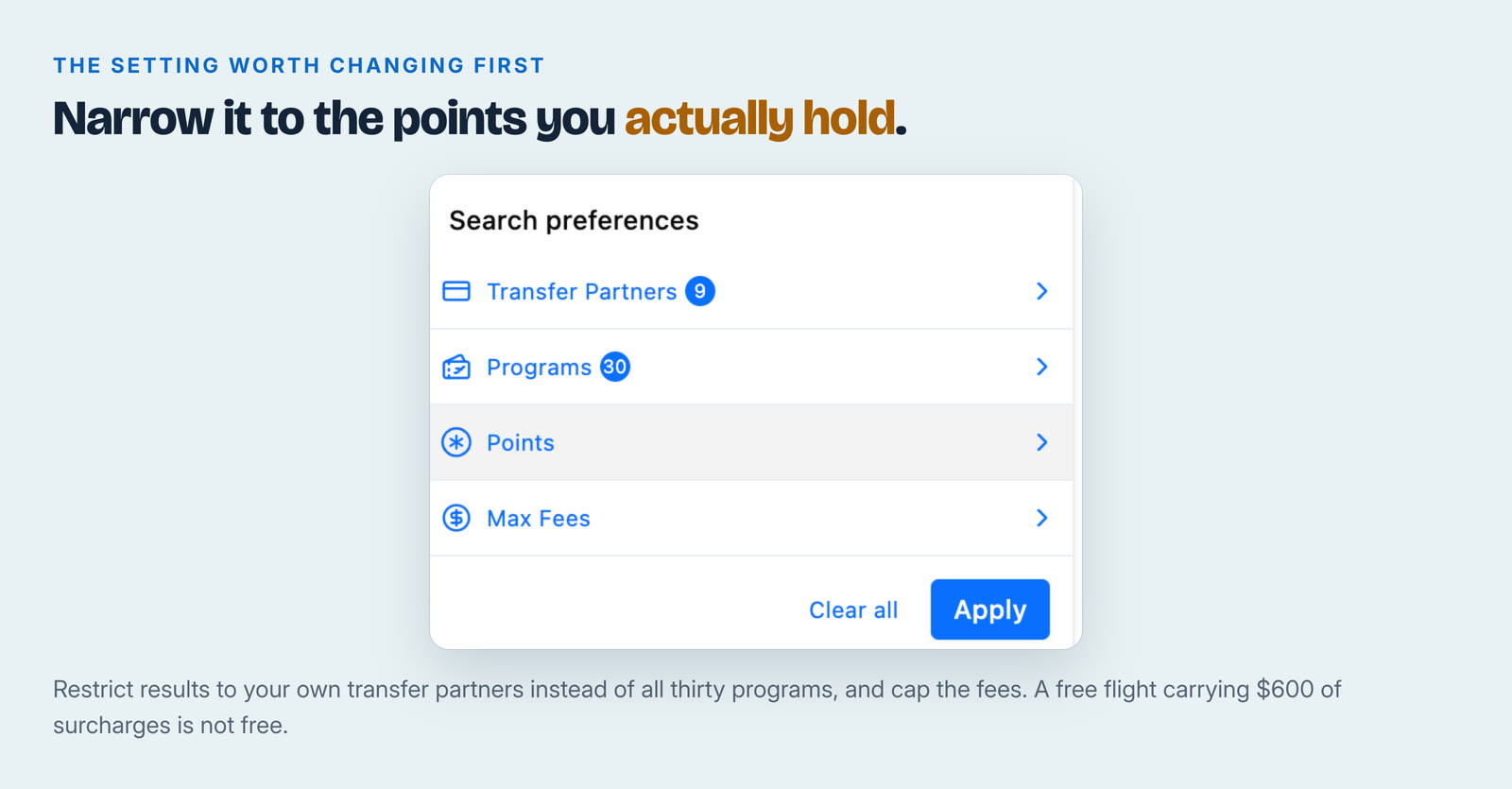
You can restrict results to your own transfer partners rather than every program it covers, so you stop seeing seats you have no way to pay for. There is also a cap for fees, which matters more than people expect. Some award tickets carry hundreds of dollars in surcharges, and a "free" flight that costs $600 in fees is not the deal it looked like.
Set both once and the results stop being a wall of noise.
What free gets you, and what $9.99 adds
Free is not a teaser. You can search across all 24 mileage programs and set unlimited alerts without paying anything.
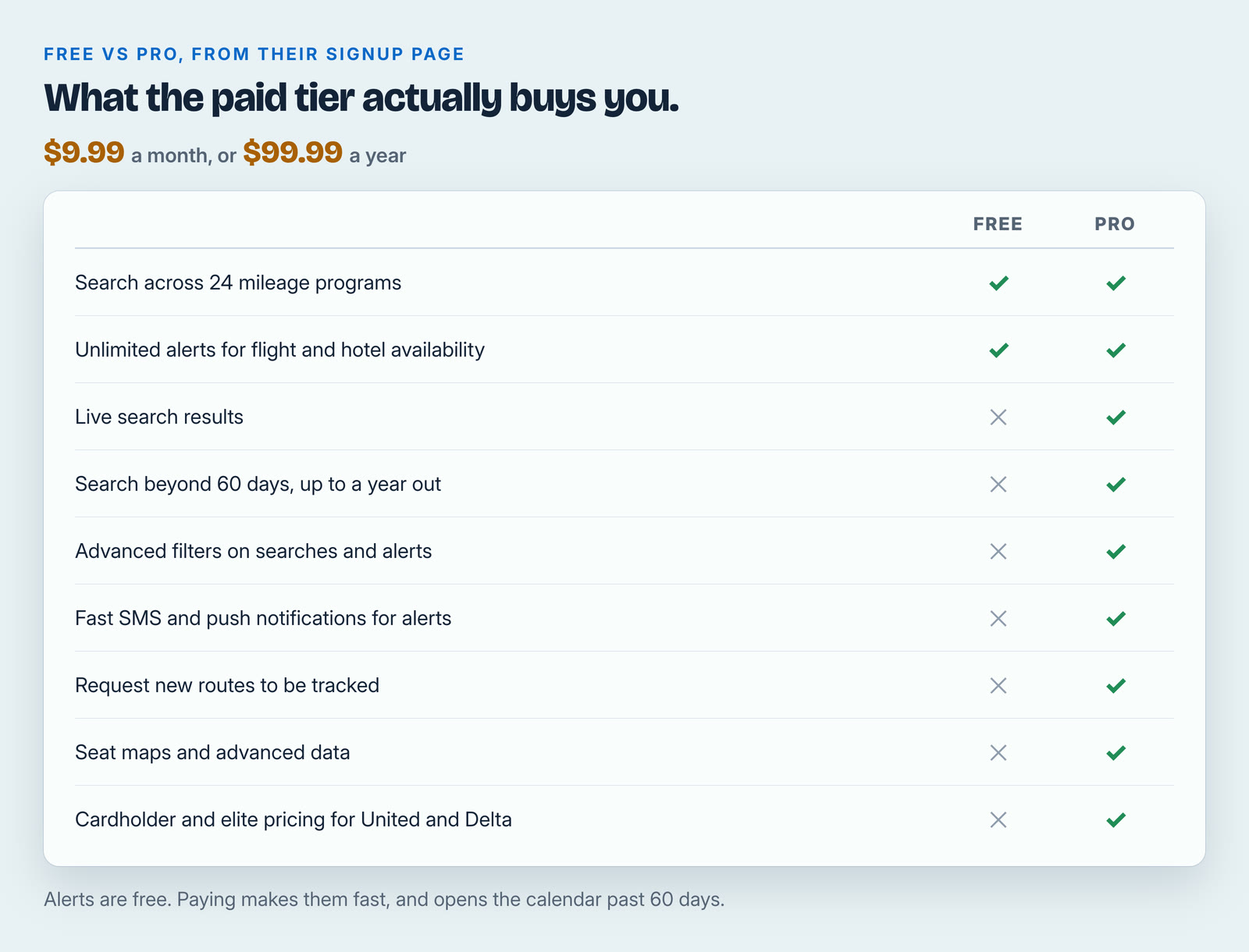
Two of the paid rows matter more than the rest.
Live results, and dates beyond sixty days. The free tier serves cached prices inside a sixty day window. Cached means the result was true when they last looked, not necessarily now. Award seats for the trips people actually plan, six months to a year out, sit entirely outside that window.
Fast alerts. Alerts are free, but the fast text and push notifications are not. On a route where two business class seats appear at midnight and are gone by morning, the difference between a fast alert and a slow one is the entire booking.
One more that is easy to skim past: Pro shows cardholder and elite pricing for United and Delta. If you hold a co-branded card from either, the price you see as a cardholder is not the public price, and the free tier will not show you yours.
Cached is not booked. Their own help documentation is direct about confirming availability and pricing on the program's own site before you move any points. That is worth repeating, and the next section is why.
At $9.99 a month or $99.99 a year, the monthly option is the one worth knowing about. You do not have to commit to a year to plan one trip. Take a month while you are actually searching, book the thing, then stop. Paying for the year works out at about $8.33 a month, so the annual plan is worth it only once this is part of how you travel rather than something you are trying.
The phone app answers a different question
The website and extension are for when you know where you want to go. The app is for when you do not.
Its App Store listing describes showing every flight available from an airport you choose, with filters for regions, cabin classes and specific carriers, plus alerts when a seat opens up. Instead of "can I get to Lisbon in March", it answers "where can I actually go from my home airport with what I have".
The alerts are the underrated part, and they cost nothing to set up. Business class award seats often appear in ones and twos, months apart, and vanish within hours. Nobody can refresh a search for six weeks. A tool can.
The iPhone app rates 4.7 out of 5 from more than 5,900 ratings, needs iOS 16.4 or later, and is free to download.
The rule that matters more than the tool
Find the seat first. Then transfer the points.
Transfers from a card program to an airline are almost always one-way and final. If you move 60,000 points to an airline and the seat is gone when you go to book, you do not get those points back. You now hold 60,000 miles in a program you might never have chosen, and you are committed to whatever that airline can do for you.
This is the most expensive mistake in the hobby, and it is the real reason a search tool earns its subscription. The tool is not selling you availability. It is selling you the ability to check fast enough to confirm a seat before you commit points you cannot get back.
So the order never changes. Find it in the search tool. Open the airline's own site and confirm it is really there at that price. Then transfer. Then book immediately, the same day.
If a transfer bonus is running, check it is still live at the moment you transfer rather than the day you found it. Our transfer partner tool tracks the end dates that quietly pass, and we run the math on which of this month's bonuses are actually worth taking — the biggest percentage is usually not the best deal.
Who should pay for this, and who should not
Worth paying for if you hold transferable points and fly internationally, or in business or first class, more than once a year. Those are exactly the seats that are hard to find by hand, and a single good booking covers the subscription many times over.
Probably not if your points sit in one airline program and you fly domestic economy on busy routes. Your own airline's search page does that job free. Cheap spontaneous domestic flying also has a cash product all its own; see what Frontier's GoWild pass actually buys before paying for award tooling.
Start free either way. Install the extension, leave it running while you browse Google Flights normally for a few weeks, and see whether it changes a single decision you make. That is a more honest test than any review, including this one.
It is also not the only tool of its kind. No single search sees every seat, so if the programs your points live in are not well covered here, our write-up of Roame covers the main alternative and when it is worth paying for.
And if it does change something, you are not signing up for a year to find out. One month at $9.99, around one trip, is a perfectly sensible way to buy this.
Our link, and what we earn
We use this tool ourselves and we pay for it ourselves.
If you sign up through our link, we earn a commission. We will be specific, because the number is unusually large and you should know it: their standard affiliate rate is 100% of a new customer's first month, or 20% of a first year, paid once. That is their published rate, not something we negotiated.
It does not change what you pay. There is no discount and we have no code. If you would rather not use our link, search for them directly and you get the identical product at the identical price.
We do not accept payment to recommend anything, and no partner sees an article before it publishes. Our full list of referral links states what we earn on every one.
The screenshots above are from one search on one date, shown to illustrate what the tool displays. They are not an offer and those seats are long gone. Product details were read off Seats.aero's own site and help documentation, their Chrome Web Store listing and their Apple App Store listing on August 9, 2026. Features, prices and free-tier limits change without notice, so treat all of it as true when we checked it. Nothing here is financial advice.
Related articles
- Roame Now Searches EVA Air Award Space. Here's Who Can Use It, and the Catch.
- Day 0, getting there: 30,000 points, three lounges and a massage chair
- seats.aero vs point.me vs Roame: Three Award Search Tools, Three Different Jobs
- Delta's SkyMiles Flash Sale Ends September 24: Round-Trip Awards From 12,800 Miles
Do this with your own numbers
- Transfer partners — every program, ratio and live transfer bonus, checked daily
- Purchase optimizer — run your own spending through the same numbers this article used